
 | ||||
PROPERTIES EDITOR ~ Add An Image ~ Link ~ ALT Text
To activate the Add An Image in PE, click on the image you want to edit or click on the Image Icon or Content Icon the Toolbar to import a new image.
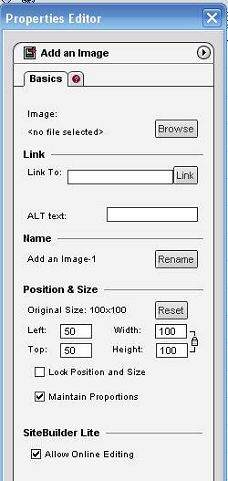
Clicking Browse will open a window where you can choose to import an image from the File Manager, Your Computer or the Image Library.
NEXT:
TOOLBARS ~ WHAT ARE ALL THOSE BUTTONS FOR?
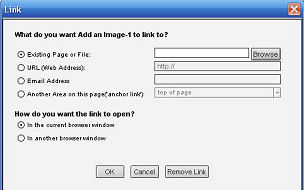
Once your image is imported, clicking the Link button will yield the window above.
*Choose Existing Page or File to link to any file or page in your File Manager.
*Choose URL for sites other than your current site.
*Choose Email Address to link to your email
*Choose Another Area on this page to link your image to another image or text on the page.
*Choose open In the current browser window for all pages within your site.
*Choose open In another browser window if you are linking to a site besides your own.
Alt Text/Tags identify an element, photo or graphic with a written description. Search Engines can not see pictures and users with visual impairments use assistive devices that also can not see pictures. By providing Alt Text/Tags you provide both the SEs and those who are visually impaired, the ability to know what the picture is about. Additionally, when a viewer's cursor passes over the object your description will appear. (In I.E.) Alt Text should be added to all photographs and graphics (clip art, etc.) on your pages. Omit them from design elements such as rectangles, borders, etc.



Use the internal search feature to the right or the site map for easy access to information.

Toolbar 1 ::
Toolbar 2 ::
Toolbar 3 - 4 ::
Toolbar 5 ::
Toolbar 6 ::


This site is not owned by Homestead Technologies™ and is not intended
as a replacement for Intuit Homestead Help Sections or Technical Support.

Copyright © 2006 - Homestead Connection - All Rights Reserved
Homestead Website Design and SEO - S&J Enterprises


